在Contact Form 7完全教程里介绍了从安装到使用,自定义监听表单状态到配合验证码防止垃圾邮件等功能的使用过程,配合邮件插件可以很方便的提醒。之前自定义的邮件格式,使用 [_url] 可以获取提交的表单地址,[_remote_ip] 可以获取提交的IP。如果需要直接显示提交的地区或者国家呢?这个是开发过程中,由业务提出的需求,有了国家可以方便分辨是否是真的客户还是故意垃圾的邮件。
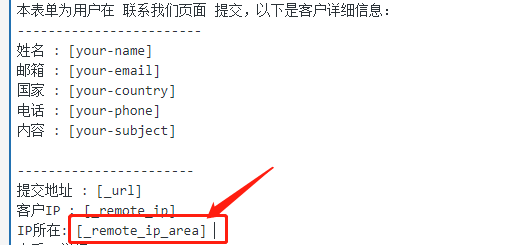
Contact Form 7并没有自带获取国家的字段,需要进行自定义处理,国家地区就是根据IP去获取的,所以只要有那么一个IP库,在自定义一个国家的字段,使其可以在邮件格式那里可以使用就行。自定义功能自然需要在functions.php里,下面是自定义了[_remote_ip_area],这个名称,当然可以是其他的名称,保存前后一致就行,使用的是IP国家查询api也可以自由选择,这里用的是:
http://ip.globalso.com/?ip=
完整代码实现:
1 2 3 4 5 6 7 8 9 10 11 12 13 14 15 16 17 18 19 20 21 22 23 function wpcf7 \_special \_mail \_tag \_new \_add \_ip \_to \_address ( $output , $name , $html , $mail \_tag = null ) if ( ! $mail \_tag instanceof WPCF7\_MailTag ) {wpcf7\_doing\_it\_wrong ( sprintf ( '%s()' , \_\_FUNCTION\_\_ ),\_\_ ( 'The fourth parameter ($mail\_tag) must be an instance of the WPCF7\_MailTag class.' , 'contact-form-7' ), '5.2.2' ); } $name = preg\_replace ( '/^wpcf7\\./' , '\_' , $name ); $submission = WPCF7\_Submission ::get \_instance ();if ( ! $submission ) {return $output ;} if ( '\_remote\_ip\_area' == $name ) { if ( $remote \_ip = $submission ->get\_meta ( 'remote\_ip' ) ) {return file\_get\_contents ("http://ip.globalso.com/?ip=" .$remote \_ip);} else { return '未知' ;} } return $output ;} add\_filter ( 'wpcf7\_special\_mail\_tags' , 'wpcf7\_special\_mail\_tag\_new\_add\_ip\_to\_address' , 11 , 4 );
php8.0以上版本可采用最新版代码:
1
2
3
4
5
6
7
8
9
10
11
12
13
14
15
16
17
18
19
20
21
22
23
24
25
26
27
28
29
30
31
32
33
34
35
36
37
38
function wpcf7_special_mail_tag_new_add_ip_to_address( $output, $name, $html, $mail_tag = null ) { // 1. 兼容性检查:确保 $mail_tag 类型正确,避免 PHP 8 抛出类型错误 if ( ! ( $mail_tag instanceof WPCF7_MailTag ) ) { return $output; } $name = preg_replace( '/^wpcf7\./', '_', $name ); $submission = WPCF7_Submission::get_instance(); if ( ! $submission ) { return $output; } if ( '_remote_ip_area' == $name ) { $remote_ip = $submission->get_meta( 'remote_ip' ); if ( ! $remote_ip ) { return '未知'; } // 2. 生产环境核心优化:使用 WP 官方 API 替代 file_get_contents // 设置 2 秒强行超时,宁可不显示 IP 所在地,也要保证询盘邮件能准时发出 $response = wp_remote_get( "http://ip.globalso.com/?ip=" . $remote_ip, array( 'timeout' => 2, 'user-agent' => 'WordPress/' . get_bloginfo('version') ) ); // 3. 错误处理:如果接口挂了,返回“查询超时”而不是让整个发信流程报错 if ( is_wp_error( $response ) ) { return '(IP查询超时)'; } $body = wp_remote_retrieve_body( $response ); return ! empty( $body ) ? $body : '(无查询结果)'; } return $output; } add_filter( 'wpcf7_special_mail_tags', 'wpcf7_special_mail_tag_new_add_ip_to_address', 11, 4 );
这样就可以像使用[_remote_ip]一样使用[_remote_ip_area]
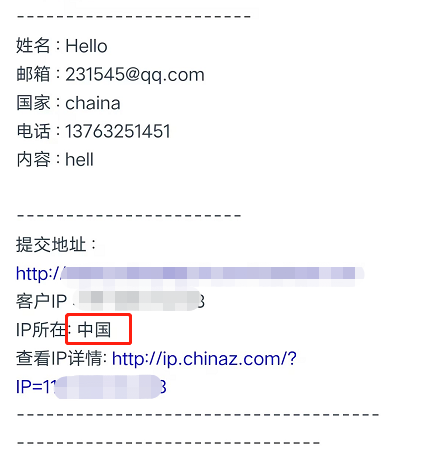
在设置好的邮件里,正确的就可以收到邮件类似:
本文作为Contact Form 7完整使用教程补充功能说明,如果后期发现还需要增加功能的也会分享出来,在一开始使用邮件表单的时候,体验过其他各种插件,只有Contact Form 7很干净,没有那么多设置页面和广告页面,然后就深入研究,自定义表单样式也来的容易,还有事件监听,到本文的获取国家功能,可以说这个插件满足了大部分功能的同时又很简洁,不会有过多用不着的代码被加载,减少前端页面的体量,深得我心。